
FaceTool: Face Swap & Generate
SuTVPhotography
4.3335.00 Reviews
- Version
- 1.1.67
- Installs
- 500.00K
- Age Rating
- Everyone
Screenshots
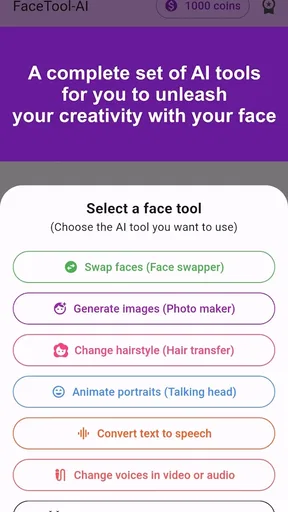

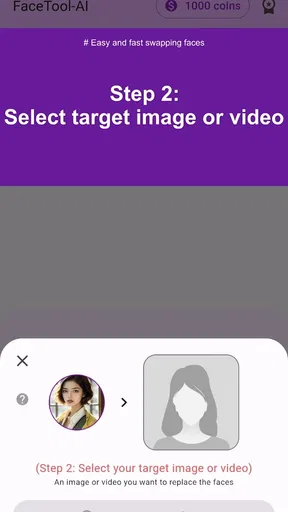

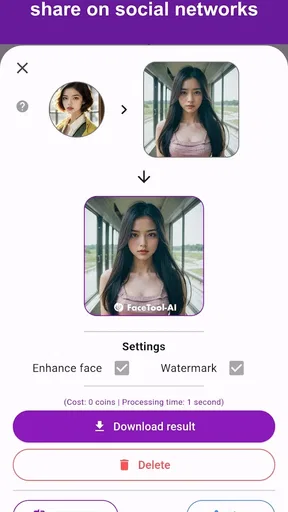
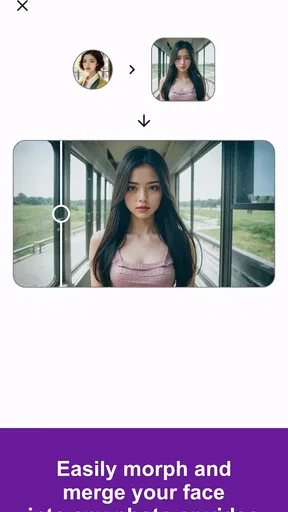


Our Review of FaceTool: Face Swap & Generate
 Analysis by Appyee
I enjoy photo apps most when they make an amusing idea easy to try without turning a spare moment into a complicated editing project. FaceTool: Face Swap & Generate is aimed squarely at that kind of playful experimentation: it lets me work with face swaps and altered portraits, then decide whether the result is worth saving or sharing. Its broader mix of photo generation and animation-style tools makes it more of a creative toy than a traditional camera editor, though that variety also means it is worth approaching with a little patience.
Who will get the most out of it
I can see this being a good fit for someone who enjoys making lighthearted images for a group chat, trying a different look for a profile picture, or finding a quick creative prompt when they have a few minutes to spare. It is less suited to people who need dependable retouching for work, precise portrait corrections, or a careful, layer-by-layer editing workflow. For those jobs, a conventional photo editor gives more direct control and makes it easier to preserve a natural result.
A useful way to think about the app is as a place to explore ideas rather than a finishing studio. I would start with a clear, well-lit portrait and make one change at a time. That gives me a better sense of whether the output is working and makes it easier to choose between versions. When the source photo is dim, crowded, or taken from an unusual angle, a face-focused effect has less clean information to work with; switching to a simpler image can be more effective than repeatedly adjusting the same one.
A playful workflow, with sensible expectations
Imagine sitting with friends after dinner and wanting a silly image to share. I would pick a photo where the face is unobstructed, try a swap, and check the result before sending it anywhere. The best outcome is not always the most realistic one: a slightly odd expression or imperfect blend can be the joke. If the image is meant to look convincing, though, I would inspect the edges, expression, and lighting rather than assuming that an automated result is ready to post.
That distinction matters because face edits can change how a person appears to others. I would ask before using a friend’s photo in a public post, and I would avoid presenting an altered image as genuine. For a private joke among people who understand the context, the app’s playful approach makes more sense than it does for professional portraits or anything intended to document a real event.
Compared with ordinary photo editors, FaceTool puts more emphasis on transforming faces than on adjusting exposure, cropping, or carefully retouching a picture. Compared with a single-purpose face-swap tool, its wider creative scope may be appealing if I want to experiment with more than one kind of portrait effect. The trade-off is that people looking for fine-grained editing controls may find a dedicated editor easier to predict. I would choose based on the task: use this for playful face-centered experiments, and reach for a conventional editor when accuracy and detailed correction matter more.
Getting Started with FaceTool
The first thing you notice when you open FaceTool: Face Swap & Generate is its slick and user-friendly interface. You’re greeted with a clean design that makes it super easy to navigate. No need to hustle with confusing menus; everything you need is right there at your fingertips.
Readability and navigation
That simple first impression is helpful for casual use: I can focus on choosing a photo and exploring an effect instead of learning a complicated editing layout. The app is a photography app from SuTV, and its range of face-focused tools gives the interface several different jobs to present. I find it useful to treat each session as a small experiment: choose one image, test one effect, and review the result before moving on. This keeps a broad toolset from feeling like a jumble of options.
The listing identifies the current version as 1.1.67 and says it requires Android 7.0 or later. The app is free to install, with in-app purchases ranging from $1.99 to $69.99 per item. I would explore the free experience before paying for anything, then consider a purchase only if a particular tool becomes part of a routine. That is especially sensible for a novelty app, where interest can depend on whether the results suit your own photos and sense of humor.
Face Swapping Made Easy
Jumping straight into the face swap feature, I was amazed at how intuitive it was. Simply snap a selfie or choose a photo from your gallery, then select the face you want to swap with. The AI behind the app is pretty impressive, seamlessly blending faces together without any awkward edges or mismatches. It’s a quick process, and before you know it, you’ve got a hilarious or astonishing new image to share.
For better odds of a usable result, I would choose a source where the face is clearly visible and not partly covered by hair, hands, or accessories. Matching the general direction of the faces can also help an edit feel less jarring. A group picture may be fun to test, but it can make it harder to judge which face is being changed and whether the result still reads clearly at a glance. Starting with a single portrait is a practical way to learn the effect before trying more complicated pictures.
Generating New Faces
Beyond swapping, you can also generate entirely new faces. This feature is a bit like having your own digital artist. You can adjust various parameters like age, gender, and even expressions. I found it fascinating to see how my face might look in different scenarios. It’s like a glimpse into alternate universes!
I would treat generated portraits as creative interpretations, not as reliable previews of how someone will actually look in another stage of life or under different circumstances. That makes the feature better for imaginative posts and personal experiments than for decisions that require a faithful likeness. It can also be useful when I want to compare a few visual directions before settling on a playful concept, but I would keep the original image so the experiment does not replace the source.
Fun with Filters and Effects
No app like this would be complete without a range of filters and effects. FaceTool doesn’t disappoint in this department. There are plenty of options to choose from, making it easy to add a little flair to your creations. Whether you’re going for a retro look or something out of this world, you’ll find the perfect filter.
One practical tip is to decide whether the face transformation or the filter should carry the joke. Applying several strong treatments at once can make it harder to tell what changed and can leave the finished image feeling busy. I prefer to make the main edit first, check that it still looks readable at the size I plan to share, and only then add an effect if it improves the idea. This also makes it easier to compare versions without losing track of what each change did.
Motor and sensory considerations
A straightforward interface can reduce the effort involved in getting started, but creative editing still asks me to make choices, tap controls, and inspect visual results. Anyone who finds small touch targets or repeated selection difficult may want to take things slowly and work with one photo at a time. I would also avoid judging a subtle effect on a very small display or in poor lighting; enlarging the image where possible and checking it in a comfortable setting makes visual details easier to assess.
The app’s focus is strongly visual, so it is naturally most useful to people who can engage with portrait images and judge whether an edit looks right. If a user relies on nonvisual guidance or needs specific accessibility controls, I would recommend checking the app directly on their device before relying on it for regular use. That is not a reason to dismiss it, but it is a sensible step when visual editing is central to the experience.
Sharing Your Creations
Once you’ve created your masterpiece, sharing it is a breeze. The app integrates smoothly with social media, allowing you to post your images directly to your favorite platforms. Whether you want to surprise your friends on Instagram or share a laugh on Facebook, FaceTool has got you covered.
For a more deliberate sharing workflow, I would pause before posting and ask whether everyone pictured would be comfortable with the edit. A quick check of the final image also helps catch an awkward crop or a result that might be mistaken for a real photograph. If I am unsure whether a joke will land outside its original context, sending it privately is a safer choice than putting it in a public feed.
Situational access and privacy
The app is rated for Everyone, which makes its basic audience broad, but that does not mean every edited image is appropriate for every viewer or setting. I would keep the tone and the people shown in mind, particularly when sharing with children, relatives, or a work group. A playful transformation can be welcome in one conversation and unwelcome in another, so the audience matters as much as the effect.
Face photos are personal, and I would be thoughtful about which images I choose to edit and share. The published description of the app says that user images are not stored on servers, a reassurance in a category that handles recognizable portraits. Even so, I would still use care with other people’s photos and check the finished image before sharing it. Good judgment around consent and context remains important regardless of how an editing tool handles an image.
Exploring the Community
Another neat feature is the community aspect. You can browse through creations from other users, which can be a great source of inspiration. It’s like an endless gallery of creativity, and you might even pick up a few ideas for your next project.
When browsing examples, I find it useful to look for the idea behind an image rather than copying the effect exactly. A simple concept can often work better than stacking every available treatment, and seeing different approaches can help me decide what suits my own photo. If I want a result that feels personal, I would use the gallery as a prompt and then build around a picture or joke that means something to my own group of friends.
Behind the Scenes: The Tech
The secret sauce behind FaceTool: Face Swap & Generate is its powerful AI. The app uses advanced facial recognition and machine learning to deliver realistic results. It's impressive how quickly it processes images, even when you're dealing with high-resolution photos.
Automated face editing is convenient, but it cannot make every source image equally easy to work with. Differences in pose, lighting, and facial expression can affect how coherent a result appears, so I would not treat a single imperfect attempt as proof that the whole idea is unusable. Trying a clearer portrait is often a better next step than adding more effects. On the other hand, if a project demands precise identity matching or professional consistency across many images, a tool designed for controlled editing is a better fit.
Moreover, the app ensures that user privacy is respected, which is always a concern with apps involving personal photos. Rest assured, your images are not stored on any servers, which is a big plus in my book.
Remaining barriers and value
FaceTool has earned an average rating of 4.3 from around 15,000 ratings, and it has more than 500,000 installs. Those figures suggest that many people have tried it, but they do not tell me whether its particular effects will match someone’s taste. With 335 written reviews, there is also room for different experiences and expectations. I would use those signals as context, not as a substitute for trying the app with a photo I am comfortable using.
The biggest practical friction is choosing the right purpose. Someone who only wants to crop, brighten, or straighten images may find a regular editor more direct, while a person who wants a funny portrait or an imaginative face transformation is more likely to appreciate this app’s focus. People who need dependable, subtle results should also be prepared to review each image rather than assuming an automated edit will always be convincing. It is a creative option, not a replacement for careful portrait work.
Because paid items are available at a range of prices, I would avoid making a purchase just to see whether the app might become useful later. First identify the specific effect or workflow you want, see whether the free use meets that need, and then decide whether spending makes sense. That approach keeps a casual experiment low-commitment and makes the price easier to judge against actual use.
Final Thoughts
Overall, FaceTool: Face Swap & Generate is a solid choice for anyone looking to have some fun with face swapping and generating new looks. It's easy to use, packed with features, and offers a delightful way to get creative with your photos. Whether you’re looking for a quick laugh or want to dive deeper into digital artistry, this app has something for everyone.
So, is it worth downloading? I’d say give it a go! It’s a fun little app to have in your arsenal, perfect for killing time or spicing up your social media feeds. Happy face swapping!
My recommendation is for people who want accessible, low-pressure portrait experiments and are happy to check their results before sharing them. I would skip it if I needed exact retouching, a professional production workflow, or an interface that has already been confirmed to meet a particular accessibility need. For casual creativity, though, its mix of face-focused tools gives me enough possibilities to justify a try. Just begin with a suitable photo, keep the audience in mind, and treat the output as an edit rather than a record of reality.
Verdict
Strengths of FaceTool: Face Swap & Generate
- Easy-to-use interface for quick swaps.
- Realistic face swap results.
- Supports multiple photo formats.
- Regular updates with new features.
- No technical skills required.
Limitations of FaceTool: Face Swap & Generate
- Ads can be intrusive at times.
- Limited free features available.
- In-app purchases can be pricey.
- Occasional glitches on older devices.
- Privacy concerns with photo uploads.
Other Releases by SuTV
View All
FaceTool: AI Face Swap Videos
Photography3.8
Similar Picks in This Category
View All
Google Photos
Google LLC4.4

Gallery
Google LLC4.2

Picsart AI Photo Editor, Video
PicsArt, Inc.3.9

B612 AI Photo&Video Editor
SNOW Corporation4.1

BeautyPlus-Selfie Photo Editor
PIXOCIAL TECHNOLOGY (SINGAPORE) PTE. LTD.4.5

Remini - AI Photo Enhancer
Bending Spoons4.1
Frequently Asked Questions
What is FaceTool: Face Swap & Generate?
FaceTool: Face Swap & Generate is a mobile application designed for Android and iOS that allows users to swap faces with others in photos and create unique images using AI technology. It offers a variety of features including real-time face swapping, multiple filters, and the ability to generate faces from scratch. This app is perfect for social media enthusiasts who love to experiment with fun and creative photo edits.
How easy is it to use FaceTool for beginners?
FaceTool is user-friendly, making it accessible for beginners. The interface is intuitive, guiding users through the face swap process with step-by-step instructions. Even those with little experience in photo editing can easily navigate the application, thanks to its straightforward design and helpful tutorials available within the app.
Are there any privacy concerns when using FaceTool?
FaceTool takes user privacy seriously. The app requires access to your photos and camera to function, but it does not store or share your personal data without consent. Users are encouraged to review the app's privacy policy to understand what data is collected and how it is used, ensuring a secure experience.
Does FaceTool offer any in-app purchases or subscriptions?
Yes, FaceTool offers in-app purchases and subscription options. While the basic features are free, users can access premium filters and advanced editing tools through a subscription. This tiered model allows users to choose the level of functionality they need, with options to pay monthly or yearly for enhanced features.
What devices and operating systems support FaceTool?
FaceTool is compatible with both Android and iOS devices. The app requires Android version 5.0 and up, and iOS version 11.0 or later. It is optimized to run smoothly on most smartphones and tablets, offering a consistent and efficient user experience regardless of the device used.
